Introduction
Welcome to the Yellow Schedule API documentation. Yellow Schedule provides a secure, RESTful API that allows developers to integrate appointment scheduling, contact management, and availability checking into their applications.
- Create, read, update, and delete appointments
- Manage contacts (patients/clients)
- Check available time slots
- Retrieve services and user information
- Receive real-time updates via webhooks
Key Features
- Keep your API keys secure - Never expose them in client-side code or public repositories
- For website booking widgets - You don't need this API! Simply use our embed code from Settings → Install Code
Authentication
The Yellow Schedule API uses JWT (JSON Web Token) bearer authentication. Include your API key in the Authorization header of every request.
Authentication Header Format
Authorization: bearer YOUR_API_KEY
Example Request
curl -X GET "https://www.yellowschedule.com/app/api/v2/services" \
  -H "Authorization: bearer YOUR_API_KEY" \
  -H "Content-Type: application/json"
// Using cURL in PHP
$apiKey = "YOUR_API_KEY";
$url = "https://www.yellowschedule.com/app/api/v2/services";

$headers = [
    'Authorization: bearer ' . $apiKey,
    'Content-Type: application/json'
];

$ch = curl_init();
curl_setopt($ch, CURLOPT_URL, $url);
curl_setopt($ch, CURLOPT_HTTPHEADER, $headers);
curl_setopt($ch, CURLOPT_RETURNTRANSFER, true);
curl_setopt($ch, CURLOPT_SSL_VERIFYPEER, true);

$response = curl_exec($ch);
$httpCode = curl_getinfo($ch, CURLINFO_HTTP_CODE);
curl_close($ch);

$data = json_decode($response, true);
// Using Fetch API
const apiKey = 'YOUR_API_KEY';
const url = 'https://www.yellowschedule.com/app/api/v2/services';

fetch(url, {
  method: 'GET',
  headers: {
    'Authorization': `bearer ${apiKey}`,
    'Content-Type': 'application/json'
  }
})
.then(response => response.json())
.then(data => console.log(data))
.catch(error => console.error('Error:', error));
import requests

api_key = "YOUR_API_KEY"
url = "https://www.yellowschedule.com/app/api/v2/services"

headers = {
    "Authorization": f"bearer {api_key}",
    "Content-Type": "application/json"
}

response = requests.get(url, headers=headers)
data = response.json()
API Keys
API keys control access to your Yellow Schedule account. Follow the principle of least privilege by creating keys with only the permissions your integration requires.
Creating an API Key
- Log in to your Yellow Schedule account
- Navigate to Settings (top right menu)
- Select API Keys
- Click Create New Key
- Select the specific functions and HTTP methods you need
- Save and securely store your API key
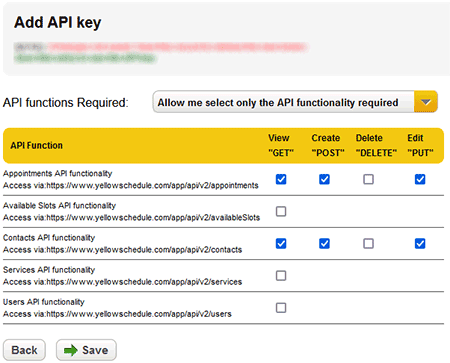
- Minimal permissions - Grant only the access needed for your use case
- Multiple keys - Create separate keys for different integrations or environments
- Regular rotation - Periodically refresh keys to maintain security
- Immediate revocation - Revoke compromised keys immediately
Permission Examples
| Use Case | Recommended Permissions |
|---|---|
| Read-only dashboard | GET on Appointments, Contacts |
| Booking system | GET POST on Appointments, Available Slots |
| CRM sync | GET POST PUT on Contacts |
| Full integration | All methods on all resources |
Quick Start
Get up and running in minutes with this simple example that retrieves your contacts.
The example below uses a real API key from a test account with read-only access to contacts. You can run this code right now to see a live response!
Live Example: Fetch Contacts
curl -X GET "https://www.yellowschedule.com/app/api/v2/contacts" \
  -H "Authorization: bearer eyJ0eXAiOiJKV1QiLCJhbGciOiJIUzI1NiJ9.eyJhIjp7ImNvbiI6InIifSwibSI6IjE2NDcxIiwidCI6MTQ4MDU5NzE5NCwiaWQiOjV9.9aExba9qw5rYr0b01dy01VezBJGb1pF-IsR9jSldO5Q"
$apiKey = "eyJ0eXAiOiJKV1QiLCJhbGciOiJIUzI1NiJ9.eyJhIjp7ImNvbiI6InIifSwibSI6IjE2NDcxIiwidCI6MTQ4MDU5NzE5NCwiaWQiOjV9.9aExba9qw5rYr0b01dy01VezBJGb1pF-IsR9jSldO5Q";
$url = "https://www.yellowschedule.com/app/api/v2/contacts";

$ch = curl_init($url);
curl_setopt($ch, CURLOPT_HTTPHEADER, [
    'Authorization: bearer ' . $apiKey
]);
curl_setopt($ch, CURLOPT_RETURNTRANSFER, true);
$response = curl_exec($ch);
curl_close($ch);

$contacts = json_decode($response, true);
print_r($contacts);
import requests

api_key = "eyJ0eXAiOiJKV1QiLCJhbGciOiJIUzI1NiJ9.eyJhIjp7ImNvbiI6InIifSwibSI6IjE2NDcxIiwidCI6MTQ4MDU5NzE5NCwiaWQiOjV9.9aExba9qw5rYr0b01dy01VezBJGb1pF-IsR9jSldO5Q"
url = "https://www.yellowschedule.com/app/api/v2/contacts"

headers = {"Authorization": f"bearer {api_key}"}
response = requests.get(url, headers=headers)
contacts = response.json()
print(contacts)
Expected Response
{
  "contacts": [
    {
      "contact_id": "con_xxxxxxxxx",
      "created_utc": "2016-01-15 12:45:56",
      "edited_utc": "2016-01-15 13:00:00",
      "firstname": "john",
      "lastname": "doe",
      "email": "test1@test.com",
      "cellphone": "123456789",
      "dob": "2000-12-25",
      "notes": "Client notes..."
    }
  ],
  "paginginfo": {
    "this_page": 1,
    "total_record_count": 1,
    "page_size": 100
  }
}
Error Handling
The Yellow Schedule API uses conventional HTTP response codes to indicate success or failure. Codes in the 2xx range indicate success, 4xx indicate client errors, and 5xx indicate server errors.
HTTP Status Codes
| Code | Status | Description |
|---|---|---|
| 200 | OK | Request succeeded |
| 400 | Bad Request | The request was malformed or invalid |
| 401 | Unauthorized | Missing, invalid, or revoked API key |
| 405 | Method Not Allowed | HTTP method not supported for this endpoint |
| 409 | Conflict | Duplicate record detected |
| 422 | Validation Error | Invalid parameters provided |
| 429 | Rate Limit Exceeded | Too many requests. See Rate Limits |
| 500 | Server Error | Something went wrong on our end |
Error Response Format
All errors include a JSON response with details about what went wrong:
{
  "error": "invalid token or token was revoked or changed",
  "code": 401,
  "details": "The provided API key is not valid"
}If you encounter a server error (5xx), please contact us with details about your request so we can investigate.
Rate Limits
To ensure fair usage and system stability, the Yellow Schedule API implements rate limiting. If you exceed your quota, you'll receive a 429 response.
1,000 requests per day per API key. Need more? Contact us to discuss higher limits.
Best Practices
- Implement exponential backoff when retrying failed requests
- Cache responses when appropriate to reduce API calls
- Use webhooks instead of polling for real-time updates
- Batch operations when possible
HTTP Methods (CRUD Operations)
The Yellow Schedule API follows RESTful conventions using standard HTTP methods to perform Create, Read, Update, and Delete (CRUD) operations.
| Method | Operation | Description |
|---|---|---|
| GET | Read | Retrieve resources (idempotent, safe) |
| POST | Create | Create new resources |
| PUT | Update | Update existing resources |
| DELETE | Delete | Remove resources (idempotent) |
Available API Endpoints
| Resource | Endpoint | Methods |
|---|---|---|
| Appointments | https://www.yellowschedule.com/app/api/v2/appointments |
GET POST PUT DELETE |
| Available Slots | https://www.yellowschedule.com/app/api/v2/availableSlots |
GET |
| Contacts | https://www.yellowschedule.com/app/api/v2/contacts |
GET POST PUT DELETE |
| Services | https://www.yellowschedule.com/app/api/v2/services |
GET |
| Users | https://www.yellowschedule.com/app/api/v2/users |
GET |
Pagination
List endpoints that return multiple results are automatically paginated. Use the page parameter to navigate through result sets.
Pagination Parameters
| Parameter | Type | Description |
|---|---|---|
| page | integer | Page number to retrieve (default: 1) |
Pagination Response
All paginated endpoints include a paginginfo object in the response:
{
  "contacts": [ ... ],
  "paginginfo": {
    "result": "records found",
    "this_page": 1,
    "record_start_count": 1,
    "record_end_count": 100,
    "total_record_count": 127,
    "page_size": 100,
    "page_count": 2,
    "developer_notes": "Pagesize for this recordset is '100'. To view the next page, pass parameter 'page=2'"
  }
}
Example: Fetching Multiple Pages
# First page (implicit page=1)
curl "https://www.yellowschedule.com/app/api/v2/contacts" \
  -H "Authorization: bearer YOUR_API_KEY"

# Second page
curl "https://www.yellowschedule.com/app/api/v2/contacts?page=2" \
  -H "Authorization: bearer YOUR_API_KEY"
$page = 1;
$allContacts = [];

do {
    $url = "https://www.yellowschedule.com/app/api/v2/contacts?page=" . $page;
    $response = /* ... make API call ... */;
    $data = json_decode($response, true);

    $allContacts = array_merge($allContacts, $data['contacts']);
    $page++;
} while ($page <= $data['paginginfo']['page_count']);
Passing Parameters
Parameters are passed differently depending on the HTTP method:
URL Query String (GET/DELETE)
curl -G "https://www.yellowschedule.com/app/api/v2/appointments" \
  -H "Authorization: bearer YOUR_API_KEY" \
  --data-urlencode "range_start=2024-01-01 09:00:00" \
  --data-urlencode "range_end=2024-01-31 17:00:00" \
  --data-urlencode "user_id=usr_xxxxx"
$params = [
    'range_start' => '2024-01-01 09:00:00',
    'range_end' => '2024-01-31 17:00:00',
    'user_id' => 'usr_xxxxx'
];
$url = 'https://www.yellowschedule.com/app/api/v2/appointments?' . http_build_query($params);
JSON Request Body (POST/PUT)
curl -X POST "https://www.yellowschedule.com/app/api/v2/appointments" \
  -H "Authorization: bearer YOUR_API_KEY" \
  -H "Content-Type: application/json" \
  -d '{
    "start": "2024-01-15 10:00:00",
    "end": "2024-01-15 11:00:00",
    "title": "Initial Consultation",
    "user_id": "usr_xxxxx",
    "contact_id": "con_xxxxx"
  }'
$data = [
    'start' => '2024-01-15 10:00:00',
    'end' => '2024-01-15 11:00:00',
    'title' => 'Initial Consultation',
    'user_id' => 'usr_xxxxx',
    'contact_id' => 'con_xxxxx'
];

curl_setopt($ch, CURLOPT_POSTFIELDS, json_encode($data));
Parameters are validated server-side. Invalid formats (especially dates) will return a 422 error with details about what needs to be corrected.
Webhooks
Webhooks allow your application to receive real-time notifications when events occur in your Yellow Schedule account, eliminating the need for polling.
Setting Up Webhooks
- Navigate to Settings → Webhooks
- Enter your webhook endpoint URL (must be HTTPS)
- Select the events you want to receive
- Save your configuration
Available Webhook Events
• appointment.updated
• appointment.deleted
• contact.updated
• contact.deleted
Webhook Payload
For security reasons, webhook payloads contain only IDs. Use the API to fetch full details.
{
  "webhook_id": "ys_apt70a47393ce381a5f42",
  "webhook_created": 1494422644,
  "type": "appointment.created",
  "appointment_id_list": [
    {"id": "apt_90TQnJjVwVET0RjcVR0YHF3YK9UY1MzN"},
    {"id": "apt_90TU4BXMUV0T0ZHVNpVVDdWeN10VTRUM"}
  ],
  "livemode": true
}
Webhook Payload Fields
| Field | Type | Description |
|---|---|---|
| webhook_id | string | Unique webhook identifier |
| webhook_created | integer | Unix timestamp (seconds) when event occurred |
| type | string | Event type (e.g., "appointment.created") |
| appointment_id_list or contact_id_list | array | List of affected resource IDs |
| livemode | boolean | true for production, false for testing |
Handling Webhooks
- Return 200 immediately - Process webhooks asynchronously
- Verify webhook_id - Track processed webhooks to prevent duplicates
- Implement idempotency - Handle duplicate deliveries gracefully
- Fetch full data - Use the API to retrieve complete resource details
Retry Policy
If your endpoint doesn't return a 200 status code, Yellow Schedule will retry the webhook:
- Up to 15 retry attempts
- Exponential backoff between retries
- First retry after 1 minute, increasing exponentially
Example Webhook Handler
// webhook-handler.php
$payload = json_decode(file_get_contents('php://input'), true);

// Return 200 immediately
http_response_code(200);

// Process asynchronously
if ($payload['type'] === 'appointment.created') {
    foreach ($payload['appointment_id_list'] as $item) {
        // Fetch full appointment details
        $appointmentId = $item['id'];
        // Process appointment...
    }
}
// Express.js webhook handler
app.post('/webhooks/yellowschedule', (req, res) => {
  const payload = req.body;

  // Return 200 immediately
  res.status(200).send('OK');

  // Process asynchronously
  if (payload.type === 'appointment.created') {
    payload.appointment_id_list.forEach(async (item) => {
      // Fetch full appointment details
      const appointment = await fetchAppointment(item.id);
      // Process appointment...
    });
  }
});
API Reference
Complete documentation for all available endpoints
Appointments
https://www.yellowschedule.com/app/api/v2/appointments
Manage appointments including creation, retrieval, updates, and deletion. Appointments can be associated with contacts, services, locations, and resources.
GET Retrieve Appointments
Retrieve a specific appointment by ID, or fetch a list of appointments within a date range.
Parameters
| Parameter | Type | Required | Description |
|---|---|---|---|
| appointment_id | string | Optional | Retrieve a specific appointment. When provided, all other parameters are ignored. Includes full contact list and status information. |
| range_start | datetime | Optional | Start of date range. Format: YYYY-MM-DD HH:MM:SS (e.g., "2024-01-01 09:00:00") |
| range_end | datetime | Optional | End of date range. Must be after range_start. |
| user_id | string | Optional | Filter appointments by user (for multi-user accounts) |
| page | integer | Optional | Page number for pagination (default: 1) |
Example Request
curl -G "https://www.yellowschedule.com/app/api/v2/appointments" \
  -H "Authorization: bearer YOUR_API_KEY" \
  --data-urlencode "range_start=2024-01-01 09:00:00" \
  --data-urlencode "range_end=2024-01-31 17:00:00" \
  --data-urlencode "user_id=usr_xxxxx"
$params = [
    'range_start' => '2024-01-01 09:00:00',
    'range_end' => '2024-01-31 17:00:00',
    'user_id' => 'usr_xxxxx'
];
$url = 'https://www.yellowschedule.com/app/api/v2/appointments?' . http_build_query($params);

$ch = curl_init($url);
curl_setopt($ch, CURLOPT_HTTPHEADER, ['Authorization: bearer YOUR_API_KEY']);
curl_setopt($ch, CURLOPT_RETURNTRANSFER, true);
$response = curl_exec($ch);
$data = json_decode($response, true);
Response
{
  "appointments": [
    {
      "id": "apt_90TQnJjVwVET0RjcVR0YHF3YK9UY1MzN",
      "user_id": "usr_90TU4BXMUV0T0ZHVNpVVDdWeN10VTRUM",
      "title": "Initial Consultation",
      "service_id": "ser_90TUspnNlV2YKV3MsVkSMl2VxljW4V3a",
      "created": "24|01|15|10|30",
      "start": "24|01|20|09|00",
      "end": "24|01|20|10|00",
      "loc_id": "0",
      "note": "First time patient",
      "tz": "America/New_York",
      "color": "b04efc",
      "contact_count": "1",
      "contact_status": "confirmed"
    }
  ],
  "paginginfo": {
    "this_page": 1,
    "total_record_count": 1,
    "page_size": 100
  }
}
POST Create Appointment
Create a new appointment. Appointments must have a user, start time, and end time. Optionally include contacts, services, locations, and resources.
Parameters
| Parameter | Type | Required | Description |
|---|---|---|---|
| user_id | string | Required | User ID to assign appointment to |
| start | datetime | Required | Start time. Format: YYYY-MM-DD HH:MM:SS |
| end | datetime | Required | End time. Must be after start time. |
| title | string | Optional | Appointment title |
| contact_id | string | Optional | Single contact ID. For multiple contacts, use contact_ids |
| contact_ids | array | Optional | Array of contact IDs for group appointments |
| service_id | string | Optional | Service ID (e.g., "X-Ray", "Consultation") |
| location_id | string | Optional | Location ID for multi-location accounts |
| room_id | string | Optional | Single room/resource ID |
| room_ids | array | Optional | Array of room/resource IDs |
| reminders | boolean | Optional | Enable automatic reminders (default: false) |
| bookable | boolean | Optional | Make slot available for online booking (default: false) |
Be careful when testing with reminders: true. Creating test appointments with real contact information will trigger actual email/SMS reminders. Test thoroughly with dummy data first!
Example Request
curl -X POST "https://www.yellowschedule.com/app/api/v2/appointments" \
  -H "Authorization: bearer YOUR_API_KEY" \
  -H "Content-Type: application/json" \
  -d '{
    "user_id": "usr_xxxxx",
    "start": "2024-01-20 09:00:00",
    "end": "2024-01-20 10:00:00",
    "title": "Initial Consultation",
    "contact_id": "con_xxxxx",
    "service_id": "ser_xxxxx",
    "reminders": true
  }'
$data = [
    'user_id' => 'usr_xxxxx',
    'start' => '2024-01-20 09:00:00',
    'end' => '2024-01-20 10:00:00',
    'title' => 'Initial Consultation',
    'contact_id' => 'con_xxxxx',
    'service_id' => 'ser_xxxxx',
    'reminders' => true
];

$ch = curl_init('https://www.yellowschedule.com/app/api/v2/appointments');
curl_setopt($ch, CURLOPT_POST, true);
curl_setopt($ch, CURLOPT_POSTFIELDS, json_encode($data));
curl_setopt($ch, CURLOPT_HTTPHEADER, [
    'Authorization: bearer YOUR_API_KEY',
    'Content-Type: application/json'
]);
curl_setopt($ch, CURLOPT_RETURNTRANSFER, true);
$response = curl_exec($ch);
Response
{
  "status": "success",
  "created_appointment_id": "apt_90TU4BXMUV0T0ZHVNpVVDdWeN10VTRUM"
}
PUT Update Appointment
Update an existing appointment. Only include the fields you want to change. Send an empty string to clear a field.
Parameters
| Parameter | Type | Required | Description |
|---|---|---|---|
| appointment_id | string | Required | ID of appointment to update |
| All other parameters same as POST (all optional for updates) | |||
Example Request
curl -X PUT "https://www.yellowschedule.com/app/api/v2/appointments" \
  -H "Authorization: bearer YOUR_API_KEY" \
  -H "Content-Type: application/json" \
  -d '{
    "appointment_id": "apt_xxxxx",
    "start": "2024-01-20 10:00:00",
    "end": "2024-01-20 11:00:00",
    "title": "Follow-up Consultation"
  }'
Response
{
  "status": "success",
  "updated_appointment_id": "apt_xxxxx"
}
DELETE Delete Appointment
Permanently delete an appointment.
Parameters
| Parameter | Type | Required | Description |
|---|---|---|---|
| appointment_id | string | Required | ID of appointment to delete |
Example Request
curl -X DELETE "https://www.yellowschedule.com/app/api/v2/appointments?appointment_id=apt_xxxxx" \
  -H "Authorization: bearer YOUR_API_KEY"
Response
{
  "status": "success",
  "deleted_appointment_id": "apt_xxxxx"
}
Available Slots
https://www.yellowschedule.com/app/api/v2/availableSlots
Check availability and find open time slots for users. Perfect for building booking interfaces.
GET Get Available Slots
Retrieve available time slots for one or more users within a specified date range.
Parameters
| Parameter | Type | Required | Description |
|---|---|---|---|
| user_id | string | Optional | Specific user ID. Omit to check all users. |
| range_start | datetime | Required | Start of date range to check |
| range_end | datetime | Required | End of date range to check |
| service_id | string | Optional | Filter slots by service duration |
Example Request
curl -G "https://www.yellowschedule.com/app/api/v2/availableSlots" \
  -H "Authorization: bearer YOUR_API_KEY" \
  --data-urlencode "user_id=usr_xxxxx" \
  --data-urlencode "range_start=2024-01-20 09:00:00" \
  --data-urlencode "range_end=2024-01-27 17:00:00" \
  --data-urlencode "service_id=ser_xxxxx"
Response
{
  "available_slots": [
    {
      "user_id": "usr_xxxxx",
      "start": "2024-01-20 09:00:00",
      "end": "2024-01-20 10:00:00",
      "duration_minutes": 60
    },
    {
      "user_id": "usr_xxxxx",
      "start": "2024-01-20 14:00:00",
      "end": "2024-01-20 15:00:00",
      "duration_minutes": 60
    }
  ]
}
Contacts
https://www.yellowschedule.com/app/api/v2/contacts
Manage contacts (clients/patients). All contact data is encrypted in transit and at rest.
GET Retrieve Contacts
Retrieve a specific contact by ID or get a list of all contacts.
Parameters
| Parameter | Type | Required | Description |
|---|---|---|---|
| contact_id | string | Optional | Retrieve specific contact. Omit to list all contacts. |
| page | integer | Optional | Page number for pagination |
POST Create Contact
Create a new contact record.
Parameters
| Parameter | Type | Required | Description |
|---|---|---|---|
| firstname | string | Required | Contact first name |
| lastname | string | Optional | Contact last name |
| string | Optional | Email address | |
| cellphone | string | Optional | Phone number |
| dob | date | Optional | Date of birth. Format: YYYY-MM-DD |
| notes | string | Optional | Notes about contact |
Example Request
curl -X POST "https://www.yellowschedule.com/app/api/v2/contacts" \
  -H "Authorization: bearer YOUR_API_KEY" \
  -H "Content-Type: application/json" \
  -d '{
    "firstname": "Jane",
    "lastname": "Smith",
    "email": "jane.smith@example.com",
    "cellphone": "+1234567890",
    "dob": "1990-05-15"
  }'
Response
{
  "status": "success",
  "created_contact_id": "con_90TU4BXMUV0T0ZHVNpVVDdWeN10VTRUM"
}
PUT Update Contact
Update an existing contact. Include contact_id and any fields to update.
DELETE Delete Contact
Permanently delete a contact by providing contact_id.
Services
https://www.yellowschedule.com/app/api/v2/services
Retrieve the list of appointment services configured in your account (e.g., "X-Ray", "Consultation", "Follow-up").
GET List Services
Get all services available on your account.
Example Request
curl "https://www.yellowschedule.com/app/api/v2/services" \
  -H "Authorization: bearer YOUR_API_KEY"
Response
{
  "services": [
    {
      "service_id": "ser_xxxxx",
      "name": "Initial Consultation",
      "duration": 60,
      "description": "First time patient consultation",
      "color": "3498db"
    },
    {
      "service_id": "ser_yyyyy",
      "name": "Follow-up",
      "duration": 30,
      "description": "Return visit",
      "color": "2ecc71"
    }
  ]
}
Users
https://www.yellowschedule.com/app/api/v2/users
Retrieve users (staff members) on your Yellow Schedule account.
GET List Users
Get all users configured on your account.
Example Request
curl "https://www.yellowschedule.com/app/api/v2/users" \
  -H "Authorization: bearer YOUR_API_KEY"
Response
{
  "users": [
    {
      "user_id": "usr_xxxxx",
      "firstname": "Dr. John",
      "lastname": "Doe",
      "email": "john.doe@clinic.com",
      "title": "General Practitioner",
      "active": true
    }
  ]
}