Introduction
YellowSchedule is a secure platform for scheduling appointments with clients, and storing and tracking client (patient) details. This API allows developers to write functions to allow other systems to integrate directly with YellowSchedule. This can allows other system to, for example, create or view contacts or appointments directly in YellowSchedule.
Things you should know:
- This API is organised around RESTful web services and all API requests return JSON responses.
- Keep your API Key(s) safe. You should never expose your secret API Key in public client side source code or publicly accessible areas such GitHub.
- If you just want to take appointment bookings on your website, you do not need this API. We have easy to add booking widget which plug into any website. The API is not required for using our booking widget - you simply include a snippet of code onto your website source code to use the booking widget. The snippet is available by going to "Settings" (top right menu) >> "Install code" and can simply be pasted in your website source. Additionally we also have Wordpress, Joomla, and Drupal Plugins for the booking widget). More on setting up live bookings on your website WITHOUT requiring the use of this API.
- Create, read, update, and delete appointments
- Manage contacts (patients/clients)
- Check available time slots
- Retrieve services and user information
- Receive real-time updates via webhooks
Key Features
- Keep your API keys secure - Never expose them in client-side code or public repositories
- For website booking widgets - You don't need this API! Simply use our embed code from Settings → Install Code
Authentication
Authenticate your account when using the API by including your secret API key in the header of the request. Manage your API keys within the YellowSchedule App. Keys can be refreshed to ensure access is controlled and keys can be revoked if API access is no longer required.
All API requests must have a valid API key as part of the header of the request. The following example shows a CURL call to request all services on the account.
$ curl -H "Authorization: bearer *-API Key-*" https://www.yellowschedule.com/app/api/v2/services -X GET
$url = "https://www.yellowschedule.com/app/api/v2/services";
$APItoken =*-API Key-*;     // << insert YOUR api key and build header
$headers = array('Authorization: bearer '.$APItoken, 'Content-Type: application/json');

$ch = curl_init();
curl_setopt($ch, CURLOPT_URL, $url);
curl_setopt($ch, CURLOPT_HTTPHEADER, $headers);     // <-- pass in the header with API Key
curl_setopt($ch, CURLOPT_RETURNTRANSFER, 1);
curl_setopt($ch, CURLOPT_SSL_VERIFYPEER, 0);
curl_setopt($ch, CURLOPT_POST, 1);
curl_setopt($ch, CURLOPT_CUSTOMREQUEST, "GET");  // <-- GET Request, can also be POST,PUT or DELETE methods
$result = curl_exec($ch);
curl_close($ch);
echo $result;     // <-- see the result
require 'net/http'
require 'uri'

uri = URI.parse("https://www.yellowschedule.com/app/api/v2/services")
request = Net::HTTP::Get.new(uri)
request["Authorization"] = "bearer *-API Key-*"

response = Net::HTTP.start(uri.hostname, uri.port, use_ssl: uri.scheme == "https") do |http|
  http.request(request)
end

# response.code
# response.body
import requests

headers = {
    'Authorization': 'bearer *-API Key-*',
}

requests.get('https://www.yellowschedule.com/app/api/v2/services', headers=headers)
API Keys
When creating an API key it's a good idea to create your key with the minimal functionality that you require. For example if you only need the API for the ability to create appointments within YellowSchedule then you should create a key that only grants access to create appointments prevents access to all other functions. This is useful from a security perspective as tailoring the API key to suit your needs can help reduce the risk of exposure if there was a compromise of your system or API key. You can create as many keys as you like within YellowSchedule, with each key valid for only a single API function. You can still create just one key with access to all API functions. More on HTTP Methods/CRUD operations in YellowSchedule
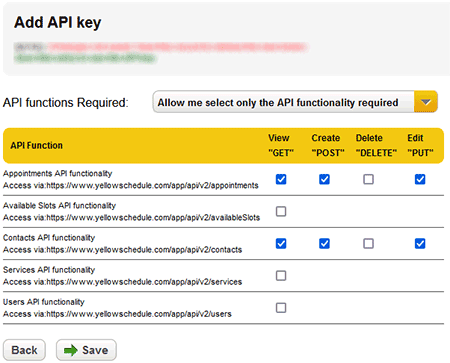
- Minimal permissions - Grant only the access needed for your use case
- Multiple keys - Create separate keys for different integrations or environments
- Regular rotation - Periodically refresh keys to maintain security
- Immediate revocation - Revoke compromised keys immediately
Permission Examples
| Use Case | Recommended Permissions |
|---|---|
| Read-only dashboard | GET on Appointments, Contacts |
| Booking system | GET POST on Appointments, Available Slots |
| CRM sync | GET POST PUT on Contacts |
| Full integration | All methods on all resources |
The example below uses a real API key from a test account with read-only access to contacts. You can run this code right now to see a live response!
Live Example: Fetch Contacts
The following example includes a live API key (from a test account) to return the contacts. Note that the included API key in the request provided here only allows access for View ("GET") requests on Contacts (https://www.yellowschedule.com/app/api/v2/contacts) and trying to use this same API key for any other request will not work. As mentioned in the previous paragraph on API keys. You can use this same idea to control access to only what is required.
$ curl -H "Authorization: bearer eyJ0eXAiOiJKV1QiLCJhbGciOiJIUzI1NiJ9.eyJhIjp7ImNvbiI6InIifSwibSI6IjE2NDcxIiwidCI6MTQ4MDU5NzE5NCwiaWQiOjV9.9aExba9qw5rYr0b01dy01VezBJGb1pF-IsR9jSldO5Q" https://www.yellowschedule.com/app/api/v2/contacts -X GET
$url = "https://www.yellowschedule.com/app/api/v2/contacts";
$APItoken = "eyJ0eXAiOiJKV1QiLCJhbGciOiJIUzI1NiJ9.eyJhIjp7ImNvbiI6InIifSwibSI6IjE2NDcxIiwidCI6MTQ4MDU5NzE5NCwiaWQiOjV9.9aExba9qw5rYr0b01dy01VezBJGb1pF-IsR9jSldO5Q";
$headers = array('Authorization: bearer '.$APItoken, 'Content-Type: application/json');

$ch = curl_init();
curl_setopt($ch, CURLOPT_URL, $url);
curl_setopt($ch, CURLOPT_HTTPHEADER, $headers);     // <-- pass in the header with API Key
curl_setopt($ch, CURLOPT_RETURNTRANSFER, 1);
curl_setopt($ch, CURLOPT_SSL_VERIFYPEER, 0);
curl_setopt($ch, CURLOPT_POST, 1);
curl_setopt($ch, CURLOPT_CUSTOMREQUEST, "GET");
$result = curl_exec($ch);
curl_close($ch);
echo $result;     // <-- see the result
require 'net/http'
require 'uri'

uri = URI.parse("https://www.yellowschedule.com/app/api/v2/contacts")
request = Net::HTTP::Get.new(uri)
request["Authorization"] = "bearer eyJ0eXAiOiJKV1QiLCJhbGciOiJIUzI1NiJ9.eyJhIjp7ImNvbiI6InIifSwibSI6IjE2NDcxIiwidCI6MTQ4MDU5NzE5NCwiaWQiOjV9.9aExba9qw5rYr0b01dy01VezBJGb1pF-IsR9jSldO5Q"

response = Net::HTTP.start(uri.hostname, uri.port, use_ssl: uri.scheme == "https") do |http|
  http.request(request)
end

# response.code
# response.body
import requests

headers = {
    'Authorization': 'bearer eyJ0eXAiOiJKV1QiLCJhbGciOiJIUzI1NiJ9.eyJhIjp7ImNvbiI6InIifSwibSI6IjE2NDcxIiwidCI6MTQ4MDU5NzE5NCwiaWQiOjV9.9aExba9qw5rYr0b01dy01VezBJGb1pF-IsR9jSldO5Q',
}

requests.get('https://www.yellowschedule.com/app/api/v2/contacts', headers=headers)
It should return JSON data containing a listing of the contacts on that test account.
{
	"contacts": [{
		"contact_id": *id*,
		"created_utc": "2016-01-15 12:45:56",
		"edited_utc": "2016-01-15 13:00:00",
		"firstname": "john",
		"lastname": "doe",
		"email": "test1@test.com",
		"cellphone": "123456789",
		"dob": "2000-12-25",
		"notes": "Some simple notes for the contact.. all contact data is encrypted in transfer and at rest!"
	}]
}
(You may notice the JSON returned in this example also includes "user_defined_data_fields" and "paginginfo" sections, more on this later)
Errors
HTTP response codes indicate the success or failure of an API request. In general, codes in the 2xx range indicate success, codes in the 4xx range indicate an error that failed given the information provided (e.g. incorrect authentication, or validation error). Codes in the 5xx range indicate an error on our end. (If you discover an error in the 5xx range, we would appreciate a quick note regarding how you came across the problem).
| HTTP response code | Description |
|---|---|
| 200 | OK (No error - everything worked as expected) |
| 400 | Bad Request (The request was unacceptable) |
| 401 | Unauthorized (No API key, or revoked or invalid API key provided for the request) |
| 405 | Method Not Allowed |
| 409 | Duplicate record |
| 422 | Validation error (Invalid parameters) |
| 429 | dailyLimitExceeded (Indicates you have exceeded the daily API quota limit. Please contact us if you need this limit raised) |
| 500 | Application or server error (something went wrong on our end) |
Note: All errors contain a description of the error, eg: HTTP 401 {"error":"invalid token or token was revoked or changed"}
HTTP Methods (CRUD Operations)
The Yellow Schedule API follows RESTful conventions using standard HTTP methods to perform Create, Read, Update, and Delete (CRUD) operations.
| Method | Operation | Description |
|---|---|---|
| GET | Read | Retrieve resources (idempotent, safe) |
| POST | Create | Create new resources |
| PUT | Update | Update existing resources |
| DELETE | Delete | Remove resources (idempotent) |
Available API Endpoints
| Resource | Endpoint | Methods |
|---|---|---|
| Appointments | https://www.yellowschedule.com/app/api/v2/appointments |
GET POST PUT DELETE |
| Available Slots | https://www.yellowschedule.com/app/api/v2/availableSlots |
GET |
| Contacts | https://www.yellowschedule.com/app/api/v2/contacts |
GET POST PUT DELETE |
| Services | https://www.yellowschedule.com/app/api/v2/services |
GET |
| Users | https://www.yellowschedule.com/app/api/v2/users |
GET |
Pagination
| Parameter | Type | Description |
|---|---|---|
| page | integer | Page number to retrieve (default: 1) |
Pagination Response
All paginated endpoints include a paginginfo object in the response:
Returns of large data sets may be broken into pages. To navigate through large data sets the same function can be called again with a parameter for "page" being passed, for example page=2.
Any functions containing pagination will have a "paginginfo" section at the end of the JSON response data explaining:
- Number of pages
- Current page
- Page size
- Total page count
- Total record count
The example below is showing a return of record 1-100 in a list of a total of 127 results. This "paginginfo" is returned with the JSON response from the server. To get the 101-127 range the API call can be repeated with parameter page=2 sent. See the section below on passing parameters to the API to learn how to do this.
.......,
"paginginfo": {
	"result": "records found",
	"this_page": 1,
	"record_start_count": 1,
	"record_end_count": 100,
	"total_record_count": 127,
	"page_size": 100,
	"page_count": 1,
	"developer_notes": "Pagesize for this recordset is '100' if the full recordset is not being returned pass in parameter 'page=2' to view the next page"
}
Example: Fetching Multiple Pages
# First page (implicit page=1)
curl "https://www.yellowschedule.com/app/api/v2/contacts" \
  -H "Authorization: bearer YOUR_API_KEY"

# Second page
curl "https://www.yellowschedule.com/app/api/v2/contacts?page=2" \
  -H "Authorization: bearer YOUR_API_KEY"
$page = 1;
$allContacts = [];

do {
    $url = "https://www.yellowschedule.com/app/api/v2/contacts?page=" . $page;
    $response = /* ... make API call ... */;
    $data = json_decode($response, true);

    $allContacts = array_merge($allContacts, $data['contacts']);
    $page++;
} while ($page <= $data['paginginfo']['page_count']);
Passing Parameters to the API
Parameters are passed differently depending on the HTTP method:
There are currently two ways to pass parameters into the API. Through a query string in the URL (for GET and DELETE methods) or Posted through the body as a JSON object (POST and PUT methods).
See examples below for passing params in both GET and POST requests:
1. A fetch (GET) is requested on all appointments between a start (range_start) and end point (range_end). (2016-11-29 09:30:00 - 2016-12-02 17:45:00) and for a particular user (user with id:usr_90zdhlGRJtCSxJkVEV2TYNzNxl1UrkmY) on the account. Parameters are passed in for "range_start", "range_end" and "user_id".
2. A (POST) is submitted to create an appointment on (2016-11-29 09:30:00 - 2016-11-29 10:00:00) for a particular user (user with id:usr_90zdhlGRJtCSxJkVEV2TYNzNxl1UrkmY) with a title (title:initial consultation 30 minutes) on the account. Parameters are passed in for "start", "end", "title" and "user_id".
These parameters will be validated on our end before the request can be satisfied. If a parameter, such as a date, is entered incorrectly, it will result in a 422 validation error code. The details of the error should explain the date format required. More on error codes.
Params passed through url (GET and DELETE Methods)
$ curl -G -H "Authorization: bearer *-API Key-*" --data-urlencode "range_start=2016-11-29 09:30:00" --data-urlencode "range_end=2016-12-02 17:45:00" --data-urlencode "user_id=usr_90zdhlGRJtCSxJkVEV2TYNzNxl1UrkmY" https://www.yellowschedule.com/app/api/v2/appointments -X GET
$url = "https://www.yellowschedule.com/app/api/v2/appointments";
$APItoken = "*-API Key-*";
$headers = array('Authorization: bearer '.$APItoken, 'Content-Type: application/json');

$fields = array(
	"range_start"=>"2016-11-29 09:30:00",
	"range_end"=>"2016-12-02 17:45:00",
	"user_id"=>"usr_90TQMB3TBB1U3gFM4hERzN1L2JEe0tCb"
);
$url .= "?".http_build_query($fields);

$ch = curl_init();
curl_setopt($ch, CURLOPT_URL, $url);
curl_setopt($ch, CURLOPT_HTTPHEADER, $headers);
curl_setopt($ch, CURLOPT_RETURNTRANSFER, 1);
curl_setopt($ch, CURLOPT_SSL_VERIFYPEER, 0);
curl_setopt($ch, CURLOPT_CUSTOMREQUEST, "GET");
$result = curl_exec($ch);
curl_close($ch);
echo $result;     // <-- see the result
require 'net/http'
require 'uri'

uri = URI.parse("https://www.yellowschedule.com/app/api/v2/appointments")
fields = { :range_start => '2016-11-29 09:30:00', :range_end => '2016-12-02 17:45:00', :user_id => 'usr_90zdhlGRJtCSxJkVEV2TYNzNxl1UrkmY' }
uri.query = URI.encode_www_form(fields)
request = Net::HTTP::Get.new(uri)
request["Authorization"] = "bearer *-API Key-*"

response = Net::HTTP.start(uri.hostname, uri.port, req_options) do |http|
  http.request(request)
end

# response.code
# response.body
import requests

headers = {
    'Authorization': 'bearer *-API Key-*',
}

fields = (
    ('range_start', '2016-11-29 09:30:00'),
    ('range_end', '2016-12-02 17:45:00'),
    ('user_id', 'usr_90zdhlGRJtCSxJkVEV2TYNzNxl1UrkmY'),
)

requests.get('https://www.yellowschedule.com/app/api/v2/appointments', headers=headers, params=fields)
Params posted through Body (POST and PUT Methods)
$ curl -H "Authorization: bearer *-API Key-*" https://www.yellowschedule.com/app/api/v2/appointments -d "{\"start\":\"2016-11-29 09:30:00\",\"end\":\"2016-11-29 10:00:00\",\"title\":\"initial consultation 30 minutes\",\"user_id\":\"usr_90zdhlGRJtCSxJkVEV2TYNzNxl1UrkmY\"}" -X POST
$url = "https://www.yellowschedule.com/app/api/v2/appointments";
$APItoken = "*-API Key-*";
$headers = array('Authorization: bearer '.$APItoken, 'Content-Type: application/json');

$fields = array(
	"start"=>"2016-11-29 09:30:00",
	"end"=>"2016-11-29 10:00:00",
	"title"=>"initial consultation 30 minutes",
	"user_id"=>"usr_90TQMB3TBB1U3gFM4hERzN1L2JEe0tCb"
);
$jsonData = json_encode($fields);

$ch = curl_init();
curl_setopt($ch, CURLOPT_URL, $url);
curl_setopt($ch, CURLOPT_HTTPHEADER, $headers);
curl_setopt($ch, CURLOPT_RETURNTRANSFER, 1);
curl_setopt($ch, CURLOPT_SSL_VERIFYPEER, 0);
curl_setopt($ch, CURLOPT_POST, 1);
curl_setopt($ch, CURLOPT_CUSTOMREQUEST, "POST");
curl_setopt($ch, CURLOPT_POSTFIELDS, $jsonData);
$result = curl_exec($ch);
curl_close($ch);
echo $result;     // <-- see the result
require 'net/http'
require 'uri'
require 'json'

uri = URI.parse("https://www.yellowschedule.com/app/api/v2/appointments")
request = Net::HTTP::Post.new(uri)
request["Authorization"] = "bearer *-API Key-*"
request.body = JSON.dump({
  "start" => "2016-11-29 09:30:00",
  "end" => "2016-11-29 10:00:00",
  "title" => "initial consultation 30 minutes",
  "user_id" => "usr_90zdhlGRJtCSxJkVEV2TYNzNxl1UrkmY"
})

response = Net::HTTP.start(uri.hostname, uri.port, use_ssl: uri.scheme == "https") do |http|
  http.request(request)
end

# response.code
# response.body
import requests

headers = {
    'Authorization': 'bearer *-API Key-*',
}

data = '{"start":"2016-11-29 09:30:00","end":"2016-11-29 10:00:00","title":"initial consultation 30 minutes","user_id":"usr_90zdhlGRJtCSxJkVEV2TYNzNxl1UrkmY"}'

requests.post('https://www.yellowschedule.com/app/api/v2/appointments', headers=headers, params=data)
Webhooks
Webhooks can be enabled by going to "Settings" (top right menu) >> "Webhooks". You can use Webhooks to be programatically notified about changes on your YellowSchedule account (for example whenever an appointment changes). When enabling webhooks, you must provide an endpoint to receive the notification. You can also select the type of webhook events that you want to be notified about. Whenever an appointment or a contact is created, updated or deleted, your application can receive a HTTP POST describing the type of change. The following webhook types are currently supported:
|
|
Handling Webhooks
- Return 200 immediately - Process webhooks asynchronously
- Verify webhook_id - Track processed webhooks to prevent duplicates
- Implement idempotency - Handle duplicate deliveries gracefully
- Fetch full data - Use the API to retrieve complete resource details
Retry Policy
If your endpoint doesn't return a 200 status code, Yellow Schedule will retry the webhook:
- Up to 15 retry attempts
- Exponential backoff between retries
- First retry after 1 minute, increasing exponentially
Responding to a webhook:
Your endpoint should return a 200 HTTP status code to indicate that the webhook was successfully received. Any other status code will indicate a failure in delivery of the webhook. In this case, YellowSchedule will try to resend the webhook. We'll try up to 15 times with an exponential backoff period.
To verify the authenticity of the webhook and for security reasons, the payload will only contain the ID of the contact or appointment that was changed. Sensitive data such as client or appointment data will never be sent in webhooks. Your application will need to be configured to use the API to retrieve the actual changes.
{
 "webhook_id":"ys_apt70a47393ce381a5f42",
 "webhook_created":1494422644,
 "type":"appointment.created",
 "appointment_id_list":
  [
   {"id":"apt_90TQnJjVwVET0RjcVR0YHF3YK9UY1MzN"},
   {"id":"apt_90TU4BXMUV0T0ZHVNpVVDdWeN10VTRUM"}
  ],
 "livemode":true
}
Payload
| Field | Type | Description |
|---|---|---|
| webhook_id | string | Unique webhook id (created by YellowSchedule) |
| webhook_created | int | GMT Unix timestamp in seconds when the event occurred |
| type | string | type of the event |
| appointment_id_list or customer_id_list |
list | list of appointments or contacts |
| id | String | Unique id of the appointment or contact |
| livemode | boolean | true or false whether is a testing or a live webhook |
API Reference
Appointments
https://www.yellowschedule.com/app/api/v2/appointments
| URL | Methods |
|---|---|
| https://www.yellowschedule.com/app/api/v2/appointments |
GET - for viewing either an indiviual appointment or a list of appointments in between a specified start and end date range POST - for creating an appointment PUT - for updating an appointment DELETE - for deleting an appointment |
GET Retrieve Appointments
Function: Appointments (GET)
Description: You can either specifiy an appointment_id to view a specific appointment, or instead set a date range (range_start, range_end) for a list of appointments to be returned. You can limit returned appointments to a particular user's appointments also using the param "user_id".
Parameters
| Field | Type | Description |
|---|---|---|
| appointment_id | string | Appointment unique id. Returns just the one appointment, all other parameters passed will be ignored. (When a GET is performed on a specific appointment_id it will return a full list of "contacts" connected to the appointment. This will also include a status field, eg cancelled/confirmed) |
| user_id | string | If multiuser account, limit return of appointments to this user. Must be valid user_id of a user on the account for the provided API key. |
| range_start | datetime | Datetime specifying the START point of the appointments to be returned in the format YYYY-MM-DD HH:MM:SS eg: 2016-10-28 08:15:00 (which equals the 28th of Oct 2016 at 8:15am) |
| range_end | datetime | Datetime specifying the END point of the appointments to be returned. range_end must be a datetime after the starttime. |
| page | number | Returned appointments may be broken into pages, requiring a page number to be passed in (see Pagination) |
"GET on appointments" JSON response sample
{
	"appointments": [{
		"id": "apt_90TQnJjVwVET0RjcVR0YHF3YK9UY1MzN",
		"user_id": "usr_90TU4BXMUV0T0ZHVNpVVDdWeN10VTRUM",
		"title": "a title, or service name",
		"service_id": "ser_90TUspnNlV2YKV3MsVkSMl2VxljW4V3a",
		"created": "16|10|26|18|18",
		"start": "16|10|27|7|00",
		"end": "16|10|27|7|30",
		"loc_id": "0",
		"note": "notes for the appointment?",
		"tz": "Europe\/Dublin",
		"color": "b04efc",
		"contact_count": "1",
		"contact_status": "confirmed"
	},{
		"id": ...
	}],
	"paginginfo": ...
}
Response
| Field | Type | Description |
|---|---|---|
| Appointments | list | list of appointments |
| id | string | Unique id of the appointment (created by YellowSchedule) |
| user_id | string | Unique id of the user whom has the appointment |
| title | string | Title of the appointment |
| service_id | string | Service Id for the appointment |
| created | string | Date and time that the appointment was created. (individual datetimes are in the format "yy|mm|dd|hh|mm" eg "16|12|13|14|30" which is 13th Dec 2016 at 2:30pm.) |
| start | string | Date and time of the start of the appointment. (individual datetimes are in the format "yy|mm|dd|hh|mm" eg "16|12|13|14|30" which is 13th Dec 2016 at 2:30pm.) |
| end | string | Date and time of the end of the appointment. (individual datetimes are in the format "yy|mm|dd|hh|mm" eg "16|12|13|14|30" which is 13th Dec 2016 at 2:30pm.) |
| loc_id | string | Location Id on Multi-location accounts only (otherwise 0) |
| note | string | Note regarding the appointment |
| tz | string | Timezone for the appointment |
| color | string | Color (in 6 digit hex eg f5e642) that the appointment will display as on the calendar |
| contact_count | number | The number of contacts (clients) on the appointment |
| contact_status | string | The status for the first contact on the appointment (eg confirmed, cancelled, noshow) |
POST Create Appointment
Function: Appointments (POST)
Description: Create an appointment on YellowSchedule using the API.
Parameters
| Field | Type | Description |
|---|---|---|
| user_id | string | Unique id of the user. Appointments created are assigned to a user and show on their calendar |
| start | datetime | Datetime specifying the Beginning time of the appointment. Format YYYY-MM-DD HH:MM:SS eg: 2016-10-28 08:15:00 (which equals the 28th of Oct 2016 at 8:15am) |
| end | datetime | Datetime specifying the END of the appointment. Format YYYY-MM-DD HH:MM:SS eg: 2016-10-28 08:45:00 (which equals the 28th of Oct 2016 at 8:45am) |
| title | string | Title for the appointment |
| contact_id | string | Id for the contact. This is who the appointment is with. |
| contact_ids | array of string | Similar to above. Use param "contact_ids" if the appointment is with multiple contacts, eg a group appointment. Use param "contact_id" where there's a single contact or "contact_ids" where they may be multiple contacts. Don't use both. If group appointments are required then you should switch on "Class Bookings" within YellowSchedule. This is done at "Settings" >> "Calendar Settings" >> "Enable class bookings". |
| service_id | string | Service id for appointment, eg a service such as "xray" will have a unique id which can be passed in to set the appointment with the correct service. Also see Services API function to get a list of services on the account. |
| room_id | string | If Rooms (or resources) are used, you can use the API to create an appointment for a specific room or other resource. See more on Room Scheduling. |
| room_ids | array of string | As above. However use this if an appointment is for multiple rooms or other resources at the same time. Use "room_id" for singular or "room_ids" for multiple. Don't use both. |
| location_id | string | If multiple locations exist for an account, you can set a particular location for the appointment. |
| reminders | boolean | If you are integrating with YellowSchedule you can create appointments which will also send automatic appointment reminders. Default is off. CRITICAL: Enabling reminders means testing your integration will send actual email and SMS reminders so test appropriately and with dummy phone numbers first. |
| bookable | boolean | Default is off. This option may only be used if "User selectable booking slots" are switched on within YellowSchedule. |
"POST on appointments" JSON response sample
{
	"status":"success",
	"created_appointment_id":"apt_90TU4BXMUV0T0ZHVNpVVDdWeN10VTRUM"
}
Response
| Field | Type | Description |
|---|---|---|
| status | string | Success (or failure) message |
| created_appointment_id | string | Unique id of the newly created appointment |
PUT Update Appointment
Function: Appointments (PUT)
Description: update an appointment on YellowSchedule using the API. Appointments can be updated sending only the param that you want to change. If you want to clear a specific field, send an empty string in the parameter.
Parameters
| Field | Type | Description |
|---|---|---|
| appointment_id | string | Unique appointment id (created by YellowSchedule) |
| user_id | string | Unique id of the user. Appointments updated can be assigned to a user different user. |
| start | datetime | Datetime specifying the Beginning time of the appointment to be updated. Format YYYY-MM-DD HH:MM:SS eg: 2016-10-28 08:15:00 (which equals the 28th of Oct 2016 at 8:15am) |
| end | datetime | Datetime specifying the END of the appointment to be updated. Format YYYY-MM-DD HH:MM:SS eg: 2016-10-28 08:45:00 (which equals the 28th of Oct 2016 at 8:45am) |
| title | string | Title for the appointment |
| contact_id | string | Id for the contact. This is who the appointment is with. |
| contact_ids | array of string | Similar to above. Use param "contact_ids" if the appointment to be updated is with multiple contacts, eg a group appointment. Use param "contact_id" where there's a single contact or "contact_ids" where they may be multiple contacts. Don't use both. If group appointments are required then you should switch on "Class Bookings" within YellowSchedule. This is done at "Settings" >> "Calendar Settings" >> "Enable class bookings". |
| service_id | string | Service id for appointment, eg a service such as "xray" will have a unique id which can be passed in to set the appointment with the correct service. Also see Services API function to get a list of services on the account. |
| room_id | string | If Rooms (or resources) are used, you can use the API to update an appointment for a specific room or other resource. See more on Room Scheduling. |
| room_ids | array of string | As above. However use this if an appointment to be updated for multiple rooms or other resources at the same time. Use "room_id" for singular or "room_ids" for multiple. Don't use both. |
| location_id | string | If multiple locations exist for an account, you can set a particular location for the appointment. |
| bookable | boolean | Default is off. This option may only be used if "User selectable booking slots" are switched on within YellowSchedule. |
"PUT on appointment" JSON response sample
{
	"status":"success",
	"updated_appointment_id":"apt_90TU4BXMUV0T0ZHVNpVVDdWeN10VTRUM"
}
Response
| Field | Type | Description |
|---|---|---|
| status | string | Success (or failure) message |
| updated_appointment_id | string | Unique id of updated appointment |
DELETE Delete Appointment
Function: Appointments (DELETE)
Description: Delete an appointment on YellowSchedule using the API.
Parameters
| Field | Type | Description |
|---|---|---|
| appointment_id | string | Unique appointment id (created by YellowSchedule) |
"DELETE on appointment" JSON response sample
{
	"status":"success",
	"deleted_appointment_id":"apt_90TU4BXMUV0T0ZHVNpVVDdWeN10VTRUM"
}
Response
| Field | Type | Description |
|---|---|---|
| status | string | Success (or failure) message |
| deleted_appointment_id | string | Unique id of deleted appointment |
Available Slots
https://www.yellowschedule.com/app/api/v2/availableSlots
| URL | Methods |
|---|---|
| https://www.yellowschedule.com/app/api/v2/availableSlots | GET - for showing free slots for users (available for booking) |
GET Get Available Slots
Function: Available Slots (GET)
Description: You can use the available slots API function to return the free (bookable) slots for a user. Instead of returning the appointments for a user, this function returns the free 'gaps' between appointments for that user.
You might choose to use this function as the first step in a custom appointment booking solution. Steps 2 and 3 would be creation of a contact and creation of an appointment with that contact. If you require online booking functionality check out our pre-built booking system first which can be included into your website with a few lines of code and should suit most use cases.
Parameters
| Field | Type | Description |
|---|---|---|
| days | number | Specifies the number of days in advance to return free slots for. Calculating appointmentSlots is computationally expensive, for best performance keep value for days as low as possible. |
| service_id | string | Returns appointments available for a particular service. To explain further, take for example a clinic which might have a service for "walk-in x ray". This service may only be available wed mornings perhaps and maybe only 2 staff members can perform this service. Passing in the parameter for service_id will return a subset of free slots which take into account the users and resources available for the specified service. Also see Services |
| singleUser | string | By default free slots for all users are returned. If you wish to return free appointment slots for an individual user in a multiuser account you can specify the username here. |
"GET on availableSlots" JSON response sample
{
	"freeslots_by_user": [{
		"user_id": "usr_90TU4BXMUV0T0ZHVNpVVDdWeN10VTRUM",
		"available_timeslots": ["16|12|12|9|00", "16|12|12|13|00", "16|12|13|14|00", "16|12|14|9|00", "16|12|14|11|00"]
	}, {
		"user_id": "usr_90TUn1maaJzMH90Rqp1M0IFMoVEUGRUb",
		"available_timeslots": ["16|12|12|10|00", "16|12|14|13|00"]
	}],
	"users": [{
		"id": "usr_90TU4BXMUV0T0ZHVNpVVDdWeN10VTRUM",
		"title": "User name1",
		"img": "https://www.yellowschedule.com/*url for profile image*"
	}, {
		"id": "usr_90TUn1maaJzMH90Rqp1M0IFMoVEUGRUb",
		"title": "User name2",
		"img": "https://www.yellowschedule.com/*url for profile image*"
	}]
}
Response
| Field | Type | Description |
|---|---|---|
| freeslots_by_user | list | list of free slot for users |
| user_id | string | id of the user |
| available_timeslots | list | simple listing of available timeslots for that user. Individual datetimes are in the format "yy|mm|dd|hh|mm" eg "16|12|13|14|30" which is 13th Dec 2016 at 2:30pm. |
| users | list | list of system users whom there maybe free slots for |
| id | string | user id - matches with "user_id" under "freeslots_by_user" |
| title | string | user name |
| img | string | url for profile image for the user |
Contacts
https://www.yellowschedule.com/app/api/v2/contacts
| URL | Methods |
|---|---|
| https://www.yellowschedule.com/app/api/v2/contacts |
GET - show a specific contact or a listing of contacts POST - create new contacts on the system PUT - for updating a contact DELETE - for deleting a contact |
GET Retrieve Contacts
Function: Contacts (GET)
Description: Shows listing of an individual contact or a list of contacts.
Parameters
| Field | Type | Description |
|---|---|---|
| contact_id | string | Returns a specific set of contact details by passing in contact_id. |
| user_id | string | Pass in a user_id if you wish to see expanded details for a particular user |
| search_field (*) | string | Used in conjunction with search_value below. You can search a particular (indexed) user defined custom field for a value. (Please contact us if you need this API function as we will need to setup search indexes for this field) |
| search_value (*) | string | Used in conjunction with search_field above. You can search a particular (indexed) user defined custom field for a value. (Please contact us if you need this API function as we will need to setup search indexes for this field) |
| page | number | Returned appointments may be broken into pages, requiring a page number to be passed in (see Pagination) |
"GET on contacts" JSON response sample
/* simple example - very little being stored for contact 85800000 */

{
	"contacts": [{
		"contact_id": "con_90TQycTbUpFRlFEduhXOrMFUyVkSOFHM",
		"created_utc": "2015-06-17 11:13:05",
		"edited_utc": null,
		"archived": 0,
		"firstname": "john",
		"lastname": "client"
	}],
	"paginginfo": ...
}/* complex example - more data for contact 85800001 plus data contained
in user-defined fields: "Policy number" and "Blood Type" */
{
"contacts": [{
"contact_id": "con_90TQEt0SyoWROp3VYNlWNNzSVFzSyVWW",
"created_utc": "2016-06-20 20:31:22",
"edited_utc": "2016-12-01 13:07:21",
"archived": 0,
"firstname": "clark",
"lastname": "kent",
"email": "clarkkent@test.com",
"cellphone": "353879999999",
"gender": "m",
"dob": "2000-12-25",
"notes": "open notes section for the client",
"user_defined_fields": [{
"field_id": 10,
"field_title": "Policy number",
"value": "5480001200"
}, {
"field_id": 20,
"field_title": "Blood Type",
"value": "AB-"
}]
}],
"user_defined_data_fields": [{
"datafield_id": "10",
"datafield_title": "Policy number",
"datafield_enabled": "0",
"enabled_for_bookings": "0",
"is_selectbox": "0"
},{
"datafield_id": "20",
"datafield_title": "Blood Type",
"datafield_enabled": "1",
"enabled_for_bookings": "0",
"is_selectbox": "1",
"selectbox_values": {
"100": "A+",
"101": "A-",
"102": "AB+",
"103": "AB-"
}
}],
"paginginfo": ...
}Response
| Field | Type | Description |
|---|---|---|
| contacts | list | Listing of the returned contacts |
| contact_id | string | Unique contact id (created by YellowSchedule) |
| created_utc | datetime | Datetime the contacts was created on the system in UTC timezone. |
| edited_utc | datetime | Datetime the contacts was last edited on the system in UTC timezone. Null if no edits have been made |
| archived | boolean | Contacts who have been archived with the system will show up as 1 (For active contacts this value will be 0). |
| firstname | string | Clients first name |
| lastname | string | Clients last name |
| string | Clients email address | |
| cellphone | string | Cellphone number of the client including country code. Domestic formatting removed eg (541) 345-5555 = 15413455555. |
| gender | string | Character indicating clients Gender (m or f). |
| dob | string | Clients date of birth |
| notes | string | Notes section for the client. (There is also seperately a Note section for Appointments if it's required to keep notes seperately for individual appointments) |
| user_defined_fields | list | You can create entirely new datafields in YellowSchedule to store client data field types that we haven't even thought of yet! More on customizable data fields |
| field_id | number | Id of the user defined datafield. These match with user_defined_data_fields.datafield_id (see below) |
| field_title | string | Field title of the user defined datafield. |
| value | string | Value of the user defined field. If the user defined text field was something like "Blood Type", this value field might be something like "AB-" |
| user_defined_data_fields | list | Full details of "user_defined_data_fields" |
| datafield_id | number | Unique id for the datafield(created by YellowSchedule) |
| datafield_title | string | Title of the user-defined data field |
| datafield_enabled | boolean | User-defined data fields can be disabled within YellowSchedule |
| enabled_for_bookings | boolean | Similar to above. User-defined data fields for clients can also be presented to the client within the YellowSchedule patient booking system (if it's used). As an example, if there's a custom data field with a title of perhaps "patient in distress?". Within YellowSchedule you could have this field enabled in the system and available to a clinician to set, but not included within the booking system so that it's never directly set by the client(patient) themselves. |
| is_selectbox | boolean | Value is 1 if the user-defined data field is a selectbox option with preselectable options |
| selectbox_values | list | Listing of user defined selectable options. Eg if the user-defined field is "Blood Type" for example the may be preentered selectable options with possible blood types. This lists available options in an id => value pair. |
| found_contact_ids (*) | list of contact ids | Listing of contact id return from an api search operation as defined by the search_field and search_value parameters above. If a search is performed using search_field and search_value params above the returned value "found_contact_ids" will be the only value return. If no search is perfomed "found_contact_ids" won't be present. |
POST Create Contact
Function: Contacts (POST)
Description: Create a contact on YellowSchedule using the API.
Parameters
| Field | Type | Description |
|---|---|---|
| user_id | string | Unique id of the user. Appointments created are assigned to a user and show on their calendar |
| firstname | string | Contact first name |
| lastname | string | Contact last name |
| string | Contact email address | |
| cellphone | string | Contact phone number. Formatting is removed and it is converted into international format on our system eg a phone number string such as "(555) 1234-555" will be accepted and converted into internation format (+15551234555) in the background on our system. |
| landline | string | Contact phone number for landline. (No attempt is ever made to send text message reminders to "landline" phone numbers) |
| address | string | A single field stores the contact address. If your address data is multi-field (eg house number, streetname, postcode etc) then please concatinate the full address into the one field seperated with commas passing the address as a single string such as: "1234 main street, sunnydale, 90210". |
| birthdate | string | If used, date of birth should be entered in three parts. For example 12 june 1979 would be birthdate of "12", birthmonth of "6" and "birthyear" of "1979". |
| birthmonth | string | See description above for birthdate. birthmonth can be entered as a number 1-12 here. |
| birthyear | string | See description above for birthdate. birthyear is the year number such as 1979. |
| gender | string | If entered gender field can be either "m" or "f". |
| notes | string | Open notes field for storage of client notes |
| stripetoken | string | We are partnered with Stripe to allow storage of credit card details for contacts to allow online billing through YellowSchedule. Credit card details cannot be directly passed to our API but instead must be posted to Stripe who will reply with a stripe token. This Stripe token can then be passed to us. Please contact us for further support if you require online payment functionality through our API. |
"POST on contacts" JSON response sample
{
	"status":"success",
	"created_contact_id":"con_90TUspnNlV2YKV3MsVkSMl2VxljW4V3a"
}
Response
| Field | Type | Description |
|---|---|---|
| status | string | Success (or failure) message |
| created_contact_id | string | Unique id of the newly created contact |
Additional note for setting contacts with custom data values
If you need to create (POST) or update (PUT) contacts and also need to set a custom data field for the contact then you can reference the field using custom_xxxx (where xxxx is a numeric field id). You can find the correct field id within the App by going to "Settings" (top right menu) >> "Contacts data fields" >> then click "Edit" beside the desired field. In light grey text beside the field title you will see the field key. See the screenshot below for an example where the field id for the additional field is custom_1534.

PUT Update Contact
Function: Contacts (PUT)
Description: Update a contact on YellowSchedule using the API. Contacts can be updated sending only the param that you want to change. If you want to clear a specific field, send an empty string in the parameter.
Parameters
| Field | Type | Description |
|---|---|---|
| contact_id | string | Unique contact id (created by YellowSchedule) |
| user_id | string | Unique id of the user. Appointments created are assigned to a user and show on their calendar |
| firstname | string | Contact first name |
| lastname | string | Contact last name |
| string | Contact email address | |
| cellphone | string | Contact phone number. Formatting is removed and it is converted into international format on our system eg a phone number string such as "(555) 1234-555" will be accepted and converted into internation format (+15551234555) in the background on our system. |
| landline | string | Contact phone number for landline. (No attempt is ever made to send text message reminders to "landline" phone numbers) |
| address | string | A single field stores the contact address. If your address data is multi-field (eg house number, streetname, postcode etc) then please concatinate the full address into the one field seperated with commas passing the address as a single string such as: "1234 main street, sunnydale, 90210". |
| birthdate | string | If used, date of birth should be entered in three parts. For example 12 june 1979 would be birthdate of "12", birthmonth of "6" and "birthyear" of "1979". |
| birthmonth | string | See description above for birthdate. birthmonth can be entered as a number 1-12 here. |
| birthyear | string | See description above for birthdate. birthyear is the year number such as 1979. |
| gender | string | If entered gender field can be either "m" or "f". |
| notes | string | Open notes field for storage of client notes |
| stripetoken | string | We are partnered with Stripe to allow storage of credit card details for contacts to allow online billing through YellowSchedule. Credit card details cannot be directly passed to our API but instead must be posted to Stripe who will reply with a stripe token. This Stripe token can then be passed to us. Please contact us for further support if you require online payment functionality through our API. |
"PUT on contacts" JSON response sample
{
	"status":"success",
	"updated_contact_id":"con_90TUspnNlV2YKV3MsVkSMl2VxljW4V3a"
}
Response
| Field | Type | Description |
|---|---|---|
| status | string | Success (or failure) message |
| updated_contact_id | string | Unique id of updated contact |
DELETE Delete Contact
Function: Contacts (DELETE)
Description: Delete a contact on YellowSchedule using the API.
Parameters
| Field | Type | Description |
|---|---|---|
| contact_id | string | Unique contact id (created by YellowSchedule) |
"DELETE on contacts" JSON response sample
{
	"status":"success",
	"deleted_contact_id":"con_90TUspnNlV2YKV3MsVkSMl2VxljW4V3a"
}
Response
| Field | Type | Description |
|---|---|---|
| status | string | Success (or failure) message |
| deleted_contact_id | string | Unique id of deleted contact |
Services
https://www.yellowschedule.com/app/api/v2/services
| URL | Methods |
|---|---|
| https://www.yellowschedule.com/app/api/v2/services | GET - show listing of services |
GET List Services
Function: Services (GET)
Description: Shows listing of services. When appointments are created a service can be set. Services are user defined and may be something like "Initial consultation" or "x-ray" for example. A price and time length can be set for the service when it's created allowing for easily scheduling of services and payment of services (if client payments are used). At present there is only GET method available to view services and services currently need to be created/edited/deleted within the YellowSchedule Application.
Parameters
| Field | Type | Description |
|---|---|---|
| service_id | string | Specify the service_id to get details of that service |
| user_id | string | Specify the user_id to only show services for that particular user |
"GET on services" JSON response sample
[{
	"service_id": "ser_90TUspnNlV2YKV3MsVkSMl2VxljW4V3a",
	"title": "initial consultation 30 minutes",
	"shorttitle": "initial 30m",
	"length": "30",
	"price": "$100",
	"users_with_access_to_service":[
		{"user_id":"usr_90zdhlGRJtCSxJkVEV2TYNzNxl1UrkmY"},
		{"user_id":"usr_90TUn1maaJzMH90Rqp1M0IFMoVEUGRUb", "restrictions":["mo|09:00:00-13:00:00","tu|09:00:00-13:00:00"]}
	]
},{
	"service_id": ...
}]
Response
| Field | Type | Description |
|---|---|---|
| service_id | string | Unique id of the service |
| title | string | Description of the service |
| shorttitle | string | Short desc of above |
| length | number | Length of service duration in minutes |
| price | string | Price of service |
| users_with_access_to_service | list | Listing of the users who are able or qualified to administer this service |
| user_id | string | Id of a user with ability to perform this service |
| restrictions | list | If 'restrictions' are present this field indicate that the service has partial availability for the user listed in the user_id above. If present this field will be a listing of strings (pipes) containing the day of week and time range the service is avail. Example "tu|09:00:00-19:00:00" indicates this service has been made only available on Tuesdays from 9am - 7pm. This can be a listing of pipes and in the JSON response example above you can see:
"users_with_access_to_service":[{
	"user_id":"usr_90TUn1maaJzMH90Rqp1M0IFMoVEUGRUb",
	"restrictions":[
		"mo|09:00:00-13:00:00","tu|09:00:00-13:00:00"
	]}]
This means the listed service 'initial consulation 30 minutes' may be available to the user identified by user_id=usr_90TUn1maaJzMH90Rqp1M0IFMoVEUGRUb only on mondays and tuesdays 9am-1pm. Administration of user-services is within the Application only ("Settings" >> "Online Booking Setup" >> "Select User" >> "Services" >> Restrictions "Edit"). |
Users
https://www.yellowschedule.com/app/api/v2/users
| URL | Methods |
|---|---|
| https://www.yellowschedule.com/app/api/v2/users | GET - show listing of users |
GET List Users
Function: Users (GET)
Description: Shows listing of user (staff) details. Add/edit/delete operations on system users must be performed within YellowSchedule at present.
Parameters
| Field | Type | Description |
|---|---|---|
| user_id | string | Pass in a user_id if you wish to see expanded details for a particular user |
"GET on users" JSON response sample
[{
	"user_id": "usr_90zdhlGRJtCSxJkVEV2TYNzNxl1UrkmY",
	"created_utc": "2015-07-14 15:24:23",
	"firstname": "John",
	"lastname": "Doe",
	"username": "johndoe",
	"display_name": "Dr. John Doe",
	"email": "johndoe@johndoe.com",
	"img": "https://www.yellowschedule.com/*url for profile image*",
	"admin": "1",
	"access_all_contacts": "1",
	"access_all_msgs": "1",
	"booking_enabled": "1"
},{
	"user_id":...
}]
Response
| Field | Type | Description |
|---|---|---|
| user_id | string | Unique id of the User. |
| created_utc | datetime | Datetime the user was created on the system in UTC timezone. |
| firstname | string | Users first name |
| lastname | string | Users lastname |
| username | string | User username that they will use for logging in |
| display_name | string | A display name for the user |
| string | Email address of the user | |
| img | string | Url to a profile image of the user |
| admin | boolean | Does the user have administator capabilities (0 or 1) |
| access_all_contacts | boolean | Does user have access to view contact details for contacts created by other users (0 or 1) |
| access_all_msgs | boolean | Does user have access to view all messages sent and received for contacts created by other users (0 or 1) |
| booking_enabled | boolean | Is online booking functionality switched on for this user (0 or 1) |